

How to Log a Benchmark Scorecard in the Darts Training App

Updated: 2 days ago
Logging your Benchmark scorecard in the darts training app takes a few minutes and shows which targets cost you points.
Once you have taken the Benchmark, logging it takes a few minutes. The full scorecard works out every score for you and shows which targets cost you points.
Step 1: Before you start
Open Benchmark in the My Performance menu and tap Log a Benchmark.
Check the date and add your board or venue if you like.
Answer Did you warm up for fifteen minutes first?
Rate How did your arm feel? from 1 to 5.
Choose Full scorecard (recommended) or Just my four sub totals.

Step 2: Singles and Power scoring
For Singles, tap 0, 1, 2 or 3 for how many darts landed in each target. For Power scoring, type your score in the target number for each visit and tick All 3 in when every dart landed for the bonus.

Step 3: Doubles and Set-up
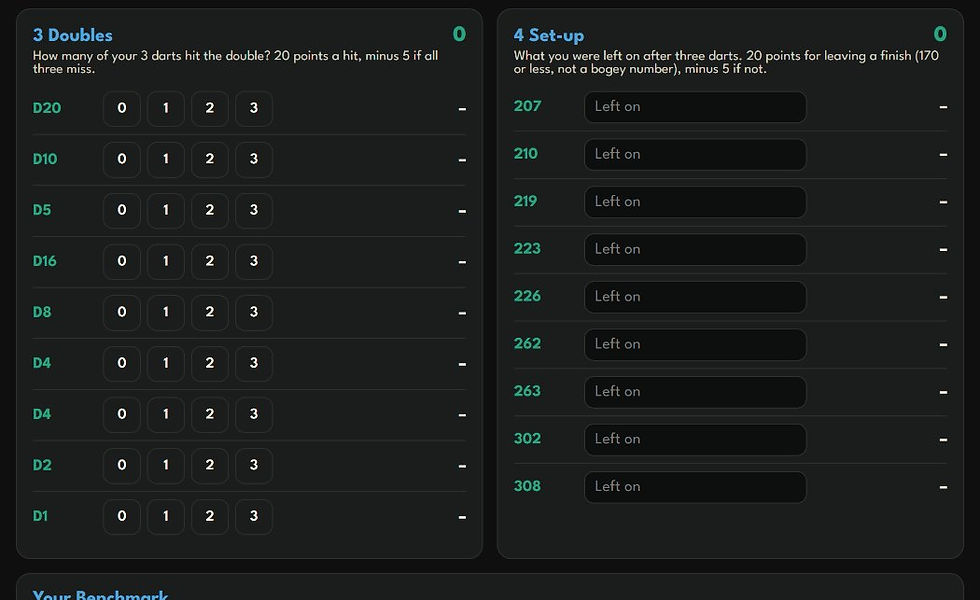
For Doubles, tap how many of your 3 darts hit each double. For Set-up, type what you were left on after each visit. The section total updates as you go.
Step 4: Save
Scroll down to Your Benchmark to see your total and save it. It appears on your Benchmark Overview and in History, and on the Benchmark leaderboards for the month.
Tip: your first Benchmark each month also moves your DartsMatt Rating, up to 25 points.
Tracking Benchmarks in the darts training app
Log a Benchmark in the darts training app every month and your trend line will show exactly where you are improving.
Darts training app FAQs
Should I use the full scorecard or sub totals?
Use the full scorecard if you can. The darts training app then works out every score and shows exactly which targets cost you points.
What counts as a good set-up leave?
Any score of 170 or less that is not a bogey number. Leaving 159, 162, 163, 165, 166, 168 or 169 scores minus 5.
Can I edit a Benchmark after saving?
Yes. Open Benchmark, tap History, then Edit on the Benchmark you want to change. Correct the score and save it again.
This guide is part of the DartsMatt app user manual, a step by step operating manual for every part of the DartsMatt darts coaching app. Next in the manual: Play DartsMattBot: Choosing the Right Darts Bot Level.
Keep improving your darts
The darts app tracks your game, but the fastest way to improve your darts is to pair it with good coaching and focused practice. These guides from the DartsMatt blog will help:
Want help from a coach? See darts coaching with Matt for online and in-person sessions.
Want to improve faster? Get coached by Matt
The app shows you what is happening in your game. DartsMatt coaching shows you how to fix it. Matt Tizzard MSc is a SightRight Certified Coach with a Professional Certificate in Sports Psychology, and he coaches players online and at his Worcester studio.
DartsMatt Coaching: a monthly Throw Analysis with written feedback in your Journal, plus personal replies to your questions.
DartsMatt Partnership: everything in Coaching, plus a monthly 60-minute Virtual Coaching session with Matt, direct WhatsApp access and a Worcester Studio session every 6 months.
See the DartsMatt coaching plans and start working with Matt this month.


